Tutor LMS 4.0 Beta 4 Is Released with GDPR Compliance, AI Quiz Generation & Key Fixes
We’re excited to announce the release of Tutor LMS 4.0 Beta 4.
This update focuses on stronger compliance support, smarter course creation with AI, and important improvements across monetization and stability. It also includes several key fixes to make the overall experience more reliable for both instructors and students.
Whether you’re concerned about data privacy, want to save time creating content, or need more reliable monetization features, Beta 4 delivers meaningful enhancements.
Key features of Tutor LMS 4.0 Beta 4
- Added GDPR compliance support for better data handling
- AI Studio can now generate quiz questions independently
- Improved H5P support in the student learning area
- Fixed WooCommerce checkout styling and enrollment issues
- Resolved revenue calculation and order issues across monetization engines
- Fixed auto-play, WPML translation, and review visibility issues, and more.
Check out the Tutor LMS 4.0 Beta 4 release note to get the full changelog.
Now, let’s jump into the key highlights of this release.
GDPR Compliance Support

The biggest highlight of Beta 4 is the introduction of comprehensive GDPR compliance support.
It gives you full control over how privacy and consent are handled inside your LMS without relying on third-party plugins or custom setups. It’s especially important for users in Europe or those serving EU-based students.
With this update, you can create unlimited GDPR-compliant consent rules according to your needs. Each compliance rule can be customized and displayed at different points across your platform to meet GDPR requirements.
Tutor LMS also maintains a complete record of when and which students have accepted the GDPR terms. You can easily track compliance activity in your dashboard and export consent logs as CSV files whenever needed.
AI-Powered Question Generation using AI Studio
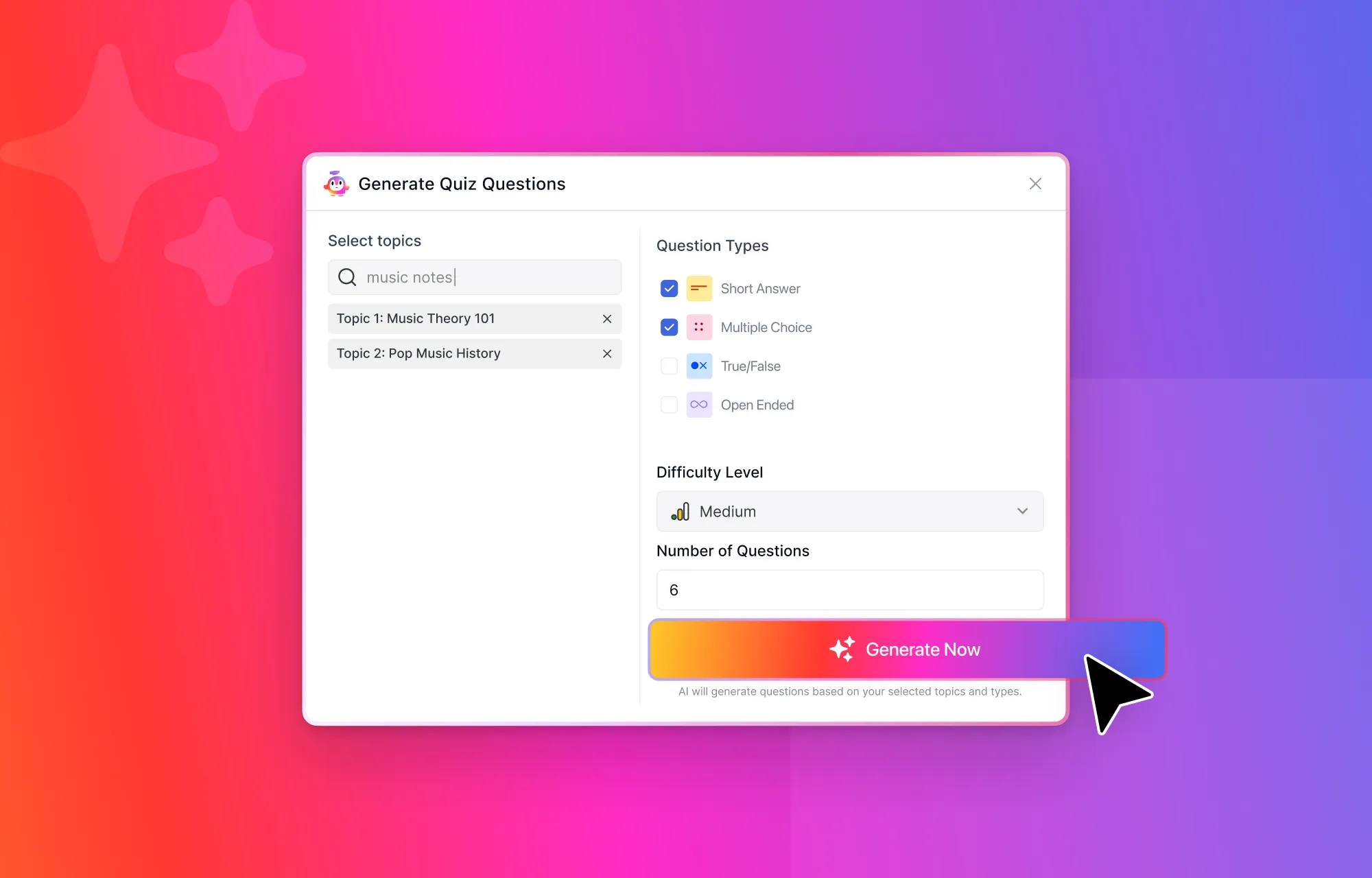
Beta 4 brings a highly requested enhancement to Tutor LMS AI Studio, and that is the ability to generate quiz questions independently.
Now, users can instantly generate quiz questions with just a few clicks. Simply select your topic, choose question types (True/False, Multiple Choice, Short Answer, or Open-Ended/Essay), set the difficulty level, and define how many questions you need.
AI Studio then intelligently creates relevant and well-structured questions tailored to your course content. This feature significantly reduces the time spent on quiz creation while maintaining excellent educational quality.
Major Updates in the Monetization
Tutor LMS 4.0 Beta 4 brings several important improvements to Tutor LMS monetization integrations to make the sales and membership management smoother and more reliable.
- For Paid Memberships Pro, we’ve introduced order history support in the order details page. It gives the admins better visibility into previous transactions directly inside Tutor LMS.
- With WooCommerce monetization, we’ve resolved checkout page styling issues and fixed a problem where enrollment status was not updating correctly after refunds or cancellations. This ensures a more reliable flow from purchase to enrollment.
- For Easy Digital Downloads, we’ve addressed multiple issues, including a missing order history display, broken “Add to Cart” functionality, and inconsistencies in how orders are displayed in Tutor LMS.
- We’ve also fixed a revenue calculation issue for manual enrollments, ensuring earnings are now recorded accurately across all enrollment types.
These updates significantly enhance the reliability of your eCommerce engines to ensure accurate revenue tracking, proper order visibility, and a better checkout experience for your students.
Other Notable Fixes and Improvements
This release also includes a set of important fixes and improvements across the learning experience and system compatibility.
- The H5P integration in the student learning area has been improved to ensure greater stability and smoother content delivery.
- We’ve fixed an issue where the auto-play next lesson feature was not working as expected, ensuring a continuous learning flow for students.
- A WPML translation issue on the assignment page in legacy mode has been resolved, improving multilingual reliability for course content.
- We also addressed a case where ratings and reviews were appearing before course completion, making sure feedback is now properly tied to course progress.
These updates help improve overall learning consistency, compatibility, and user experience across different setups.
How to Download Beta 4
You can download Tutor LMS 4.0 Beta 4 from the links below:
We recommend installing Beta versions on a staging or test environment rather than a live production site. This helps you explore new features and updates safely while providing valuable feedback.
Try Beta 4 and Share Feedback
Tutor LMS 4.0 Beta 4 is another step closer to the final release, bringing meaningful improvements across compliance, AI, monetization, and overall stability.
We encourage you to try this beta version in a staging environment, explore the new features, and share your valuable feedback via our feedback form.
Your feedback helps us identify edge cases, improve usability, and fine-tune performance before the official release. Every single piece of feedback helps us to make Tutor LMS 4.0 more reliable and ready for production.

Start Using Tutor LMS Today
Ready to take your online courses to new heights? Download Tutor LMS now and enjoy a journey of eLearning excellence.