Most course creators spend weeks perfecting their content. They obsess over lesson structure, video quality, and quiz design. But when it comes to pricing? They slap on a one-time fee and move on.
That single decision could be costing you thousands.
The debate between subscription and one-time purchase course pricing models isn’t new. One gives you predictable, recurring revenue that compounds month after month. The other puts more cash in your pocket right away. Both work, but choosing the wrong one for your situation leaves real money on the table.
This article breaks down both models. You’ll see exactly when subscriptions outperform, when one-time pricing wins, and how to set up either option (or both) inside Tutor LMS.
How Subscription and One-Time Course Pricing Models Work
Before diving in, let’s make sure we’re on the same page about how each model actually works.
One-Time Purchase
This one’s straightforward. A student pays a single price, and they get access to your course. That access could be lifetime or limited to a set period, depending on how you configure it.
Your revenue formula is simple: number of sales × course price. It’s the most common pricing model for standalone, self-paced courses, and it’s probably what you started with.
Subscription
With a subscription model, students pay on a recurring basis, whether that’s weekly, monthly, quarterly, or annually. As long as they keep paying, they keep learning.
Your revenue formula shifts to: active subscribers × recurring fee. This model really shines when you offer multiple courses or regularly publish fresh content that keeps students coming back.
Here’s how the two stack up side by side:
| Factor | One-Time Purchase | Subscription |
| Revenue type | Single lump sum | Recurring |
| Best for | Flagship / standalone courses | Course libraries & ongoing content |
| Cash flow | Spiky, launch-driven | Predictable & compounding |
| Student commitment | Lower long-term barrier | Ongoing relationship |
| Churn risk | None (already paid) | Yes, requires active retention |
Now that the basics are covered, let’s look at what really matters: which model actually puts more money in your account?
Which Course Pricing Model Fits Your Business?
Knowing the model is one thing. Knowing which course pricing strategy matches your situation is what actually drives results. This section breaks down the decision into clear scenarios so you can move forward with confidence.
When One-Time Pricing Is the Stronger Choice
Not every course needs a subscription behind it. For many creators, a straightforward one-time price tag is the stronger, simpler choice. And there’s absolutely nothing wrong with that.
This model tends to work best when:
- You sell a single, premium course: A flagship program priced anywhere from $299 to $999 can generate more revenue per student than years of $19/month subscriptions. One well-positioned transaction often outperforms a long string of smaller ones.
- Your audience resists ongoing commitments: Hobbyists, casual students, and budget-conscious buyers tend to shy away from recurring charges. They want to pay once, keep lifetime access, and never worry about cancellation dates.
- You don’t plan to add content regularly: Subscriptions demand a constant flow of fresh material to justify the recurring cost. If your style is more “build it once and let it sell,” one-time pricing removes that content treadmill entirely.
- Your marketing thrives on launches: Webinar funnels, limited-time discounts, and high-energy email sequences all run on urgency. One-time pricing fits the “doors are closing” momentum that drives launch-based strategies.
When a Subscription Pricing Model Is the Clear Winner
Of course, there are plenty of scenarios where subscriptions become the obvious winner instead. If your business model supports ongoing content delivery, recurring revenue can genuinely change everything.
Subscriptions tend to work best when:
- You have, or plan to build, a growing course library: Even three to five courses make a subscription compelling. The perceived value of “access everything for one monthly fee” almost always exceeds what any single course price could deliver.
- You create content on a regular schedule: Weekly live sessions, monthly new modules, or a drip-fed curriculum all give subscribers a clear reason to stay. Consistency is what keeps churn low and engagement high.
- You want predictable, compounding revenue: Recurring payments allow income forecasting and confident reinvestment. That stability changes how you plan your business.
- You serve professional or B2B learners: Corporate teams and career-focused students already expect subscription-style access. Platforms like LinkedIn Learning and Coursera Plus have normalized this model across professional development.
- You want to maximize Customer Lifetime Value (CLV): A student paying $19/month for 12 months generates $228 in total. That more than doubles a $99 one-time purchase, and the gap only keeps widening the longer they stay subscribed.
Hybrid Course Pricing: Combining Subscriptions and One-Time Purchases
After reading the last two sections, you might be wondering which model fits your situation better. The honest answer? You may not have to choose at all.
A hybrid pricing model lets you offer individual courses at a one-time price while also running an “all-access” subscription plan alongside them. It sounds simple because it genuinely is. And yet, most course creators overlook it completely.
Why does this work so well?
- It captures buyers at every price tolerance level. Cautious newcomers buy a single course, committed learners grab the subscription
- And one-time buyers who love their first course often upgrade to the subscription naturally, making it a built-in upsell rather than the only option.
Tutor LMS supports this natively. Creators can price individual courses and create subscription plans simultaneously. The platform handles access logic automatically, so there’s no conflict if a student buys individually or subscribes.
How to Set Up Your Pricing Model in Tutor LMS
Knowing which model fits is half the battle. The other half is actually getting it live on your site. The Tutor LMS ecosystem simplifies this process significantly without requiring you to write a single line of code. You will see exactly how to activate both single sales and recurring memberships, or both, in your WordPress dashboard.
Setting Up One-Time Course Pricing
For creators who want to sell courses with a simple, per-course price, the process looks like this:
- Navigate to the course editor in Tutor LMS.
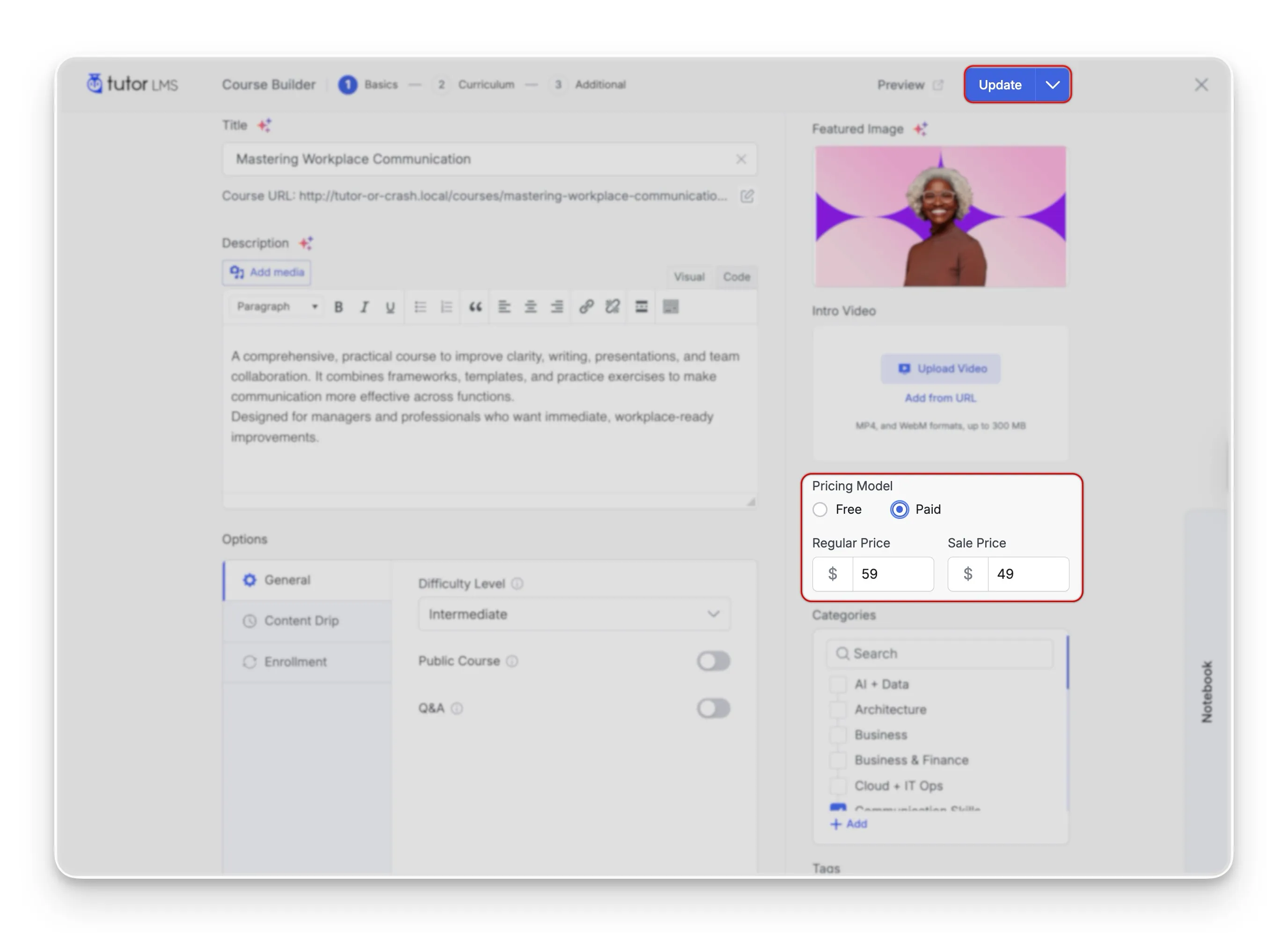
- Under “Pricing Model,” select “Paid” and set the regular price (and an optional sale price if you’re running a promotion).
- Publish the new course or Update an existing course. Students can now purchase the course individually.
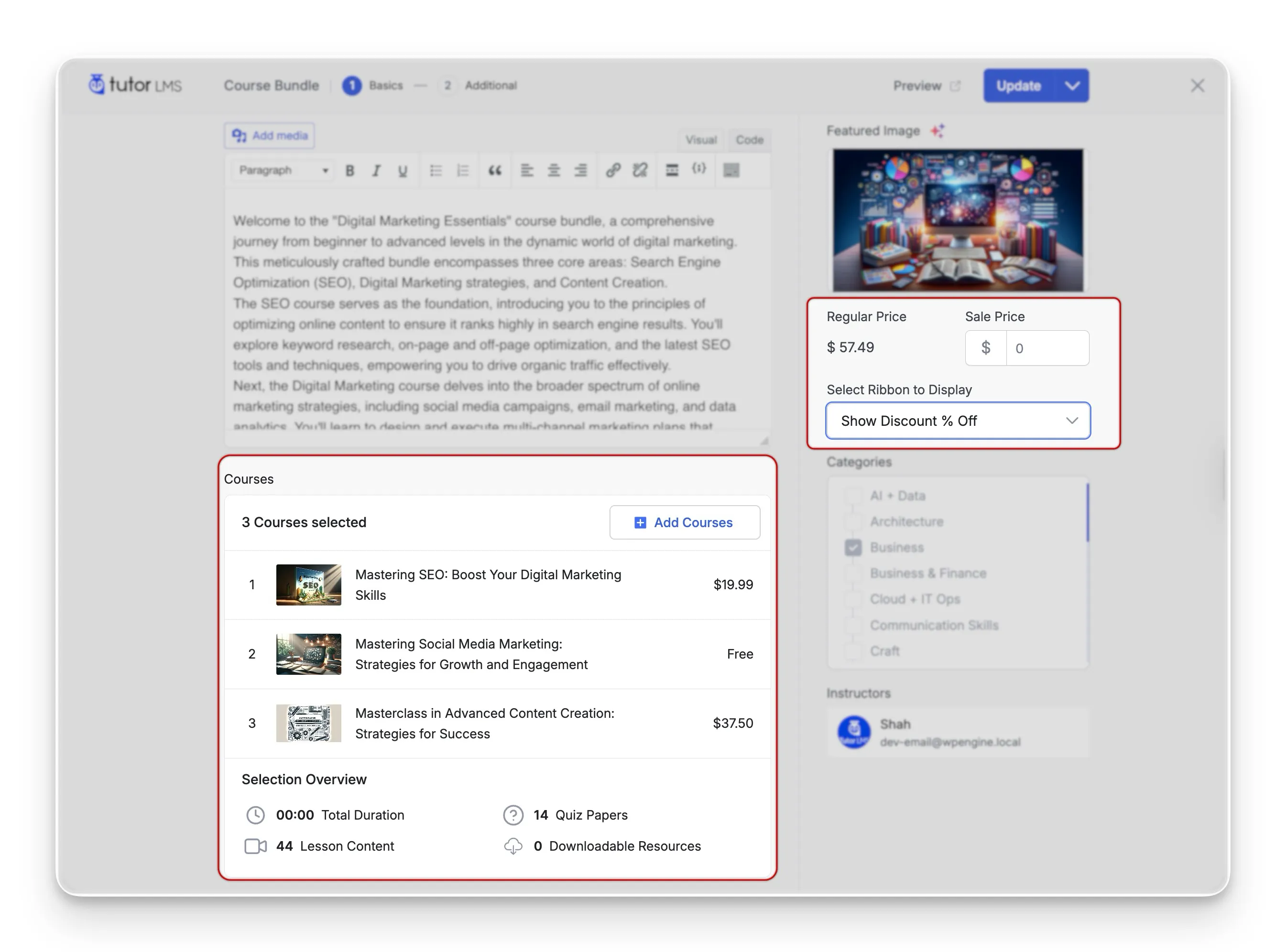
💡 Bundling tip: Course bundle pricing is a powerful tactic here. Bundling multiple courses into a single one-time package increases perceived value and average order size. This works especially well for creators with two or three related courses who aren’t ready for a full subscription model yet.
Note: To successfully process these transactions, you must select a monetization engine in your platform settings. Tutor LMS integrates perfectly with WooCommerce and EDD, but you can also use the built-in Native eCommerce system to handle checkout smoothly without installing any extra plugins.
Setting Up Subscription Plans
For creators ready to build an LMS subscription model, the Tutor LMS Subscriptions addon handles the heavy lifting. Understanding how to set up course subscriptions in Tutor may feel complex at first, but you will see how easy the whole process really is:
- Make sure Tutor LMS Pro is installed and activated (subscriptions are a Pro-only feature).
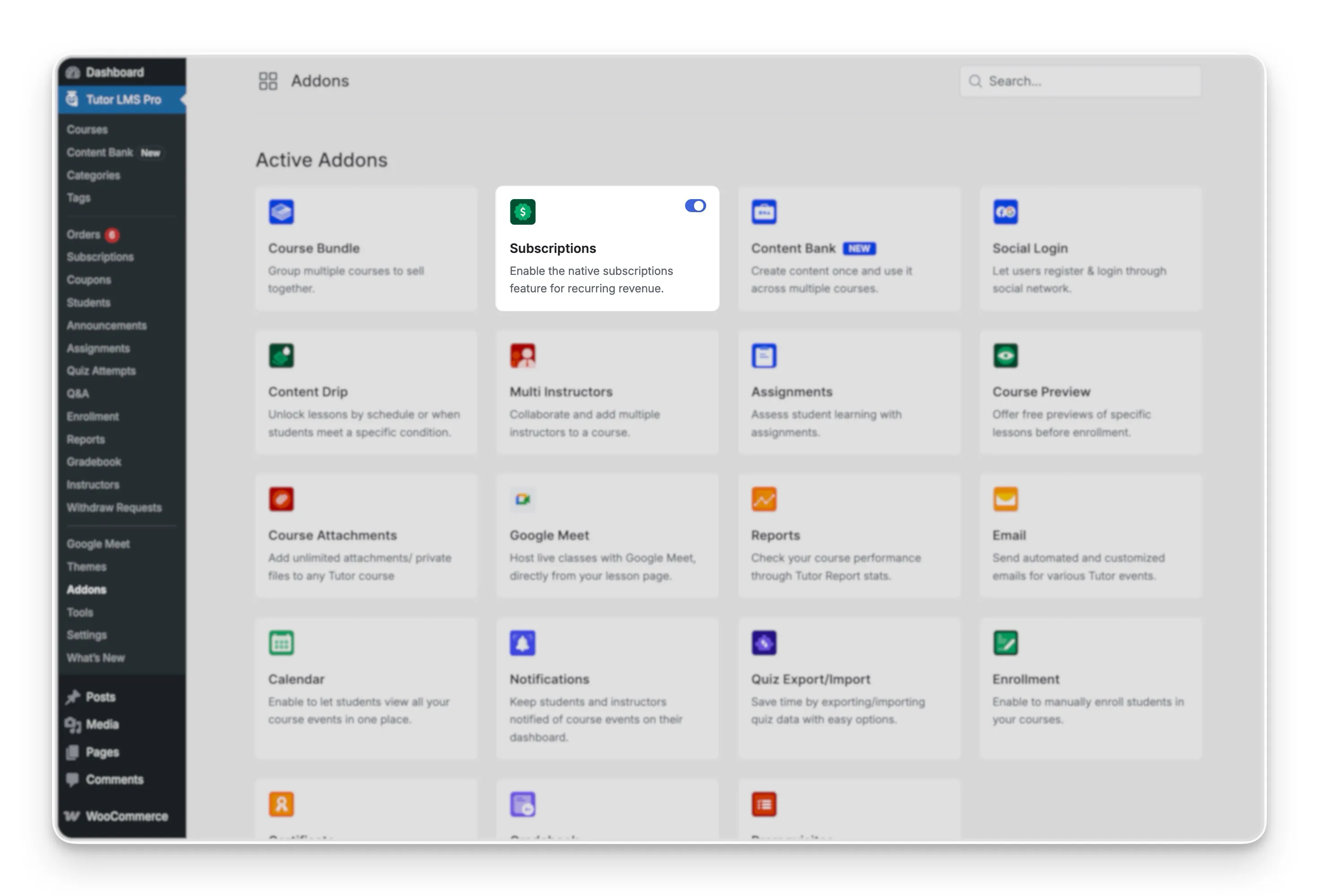
- Go to Tutor LMS → Add-ons and enable the Subscriptions addon.
- Navigate to Tutor LMS → Courses and create a new course or edit an existing one.
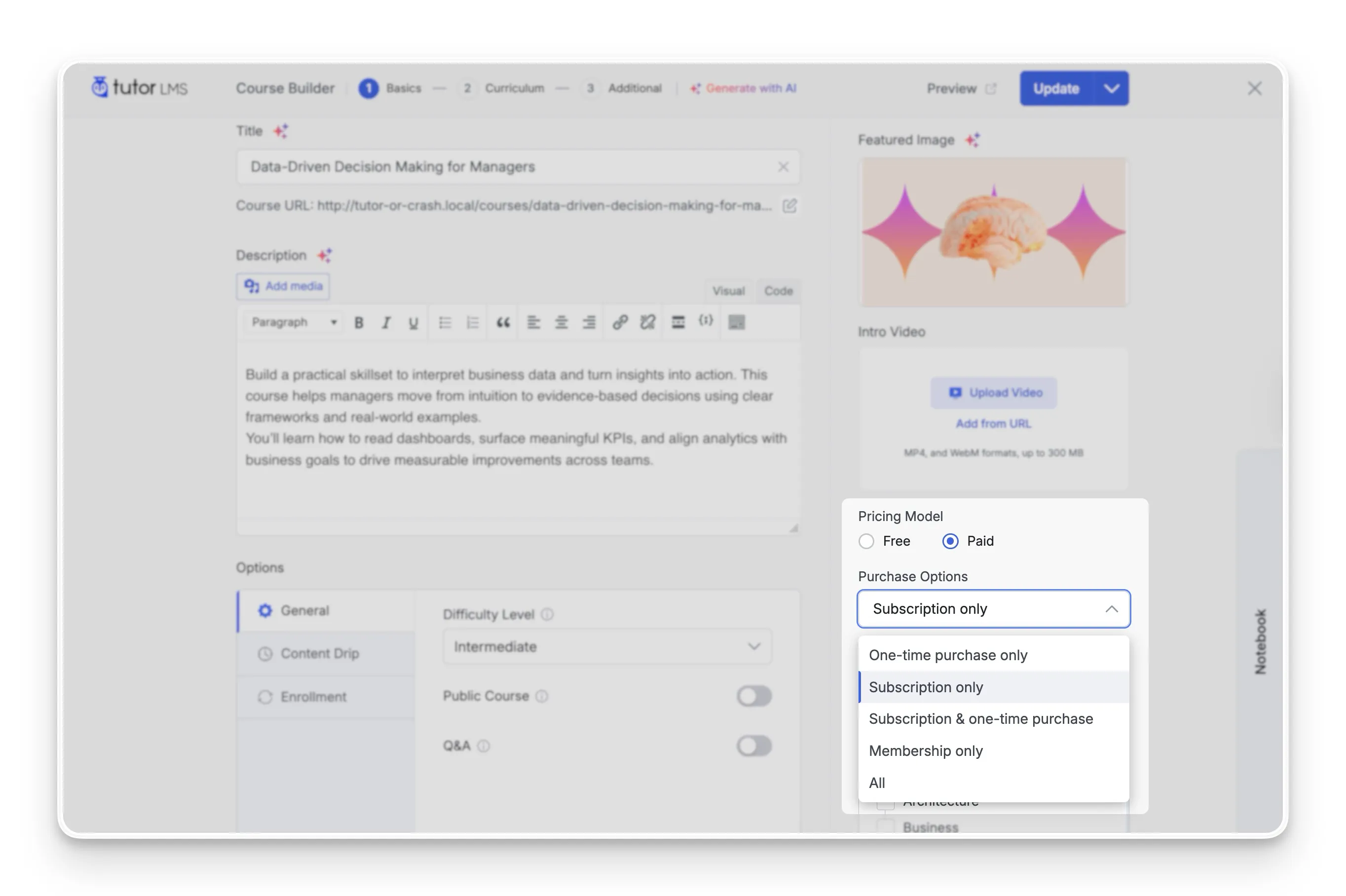
- With the Pricing Model set to Paid, in the Purchase Options dropdown menu of the course editor, select Subscription only.
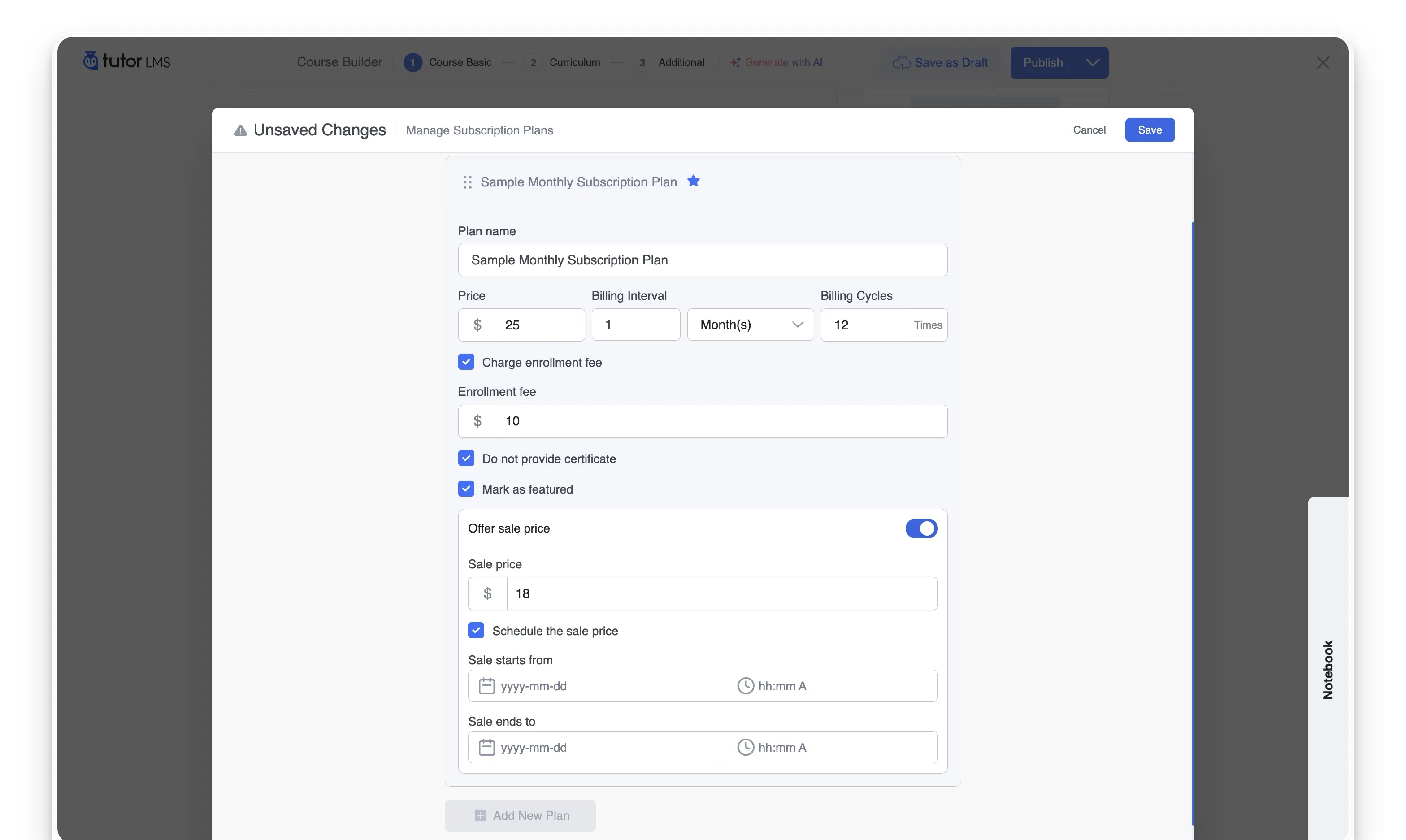
- Click Add Subscription and configure the details:
- Plan name (e.g., “Monthly Access” or “Annual Pass”)
- Recurring price
- Billing cycle (daily, weekly, monthly, or annually)
- Limit on the number of billing cycles
- (Optional) Provide Certificate
- (Optional) One-time signup/Enrollment fee
- (Optional) Mark as the featured pricing option
- (Optional) Offer a sale price
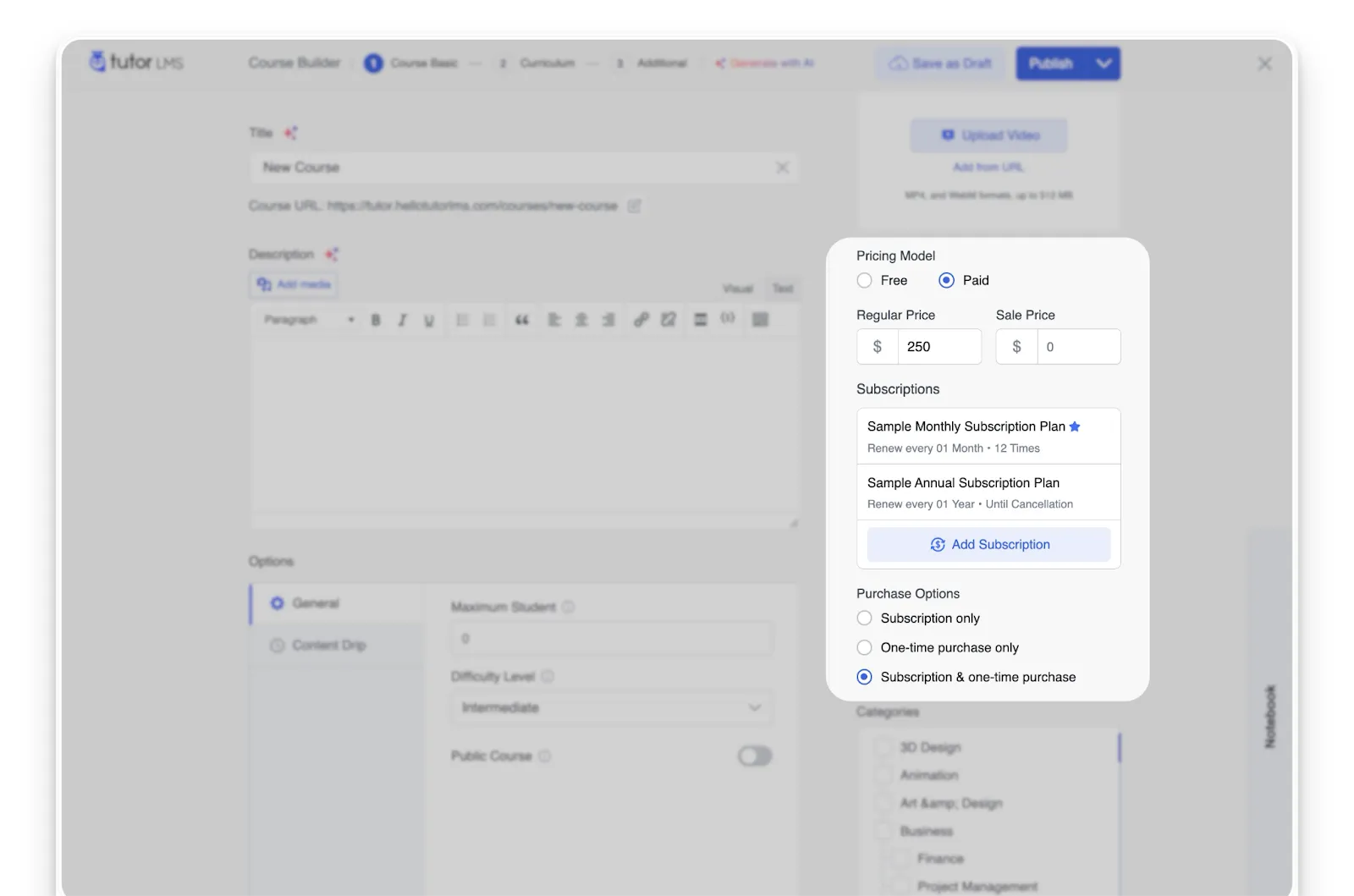
- Want to offer pricing tiers? Add multiple plans to the same course (e.g., a monthly plan alongside a discounted annual plan).
- Publish or update the course.
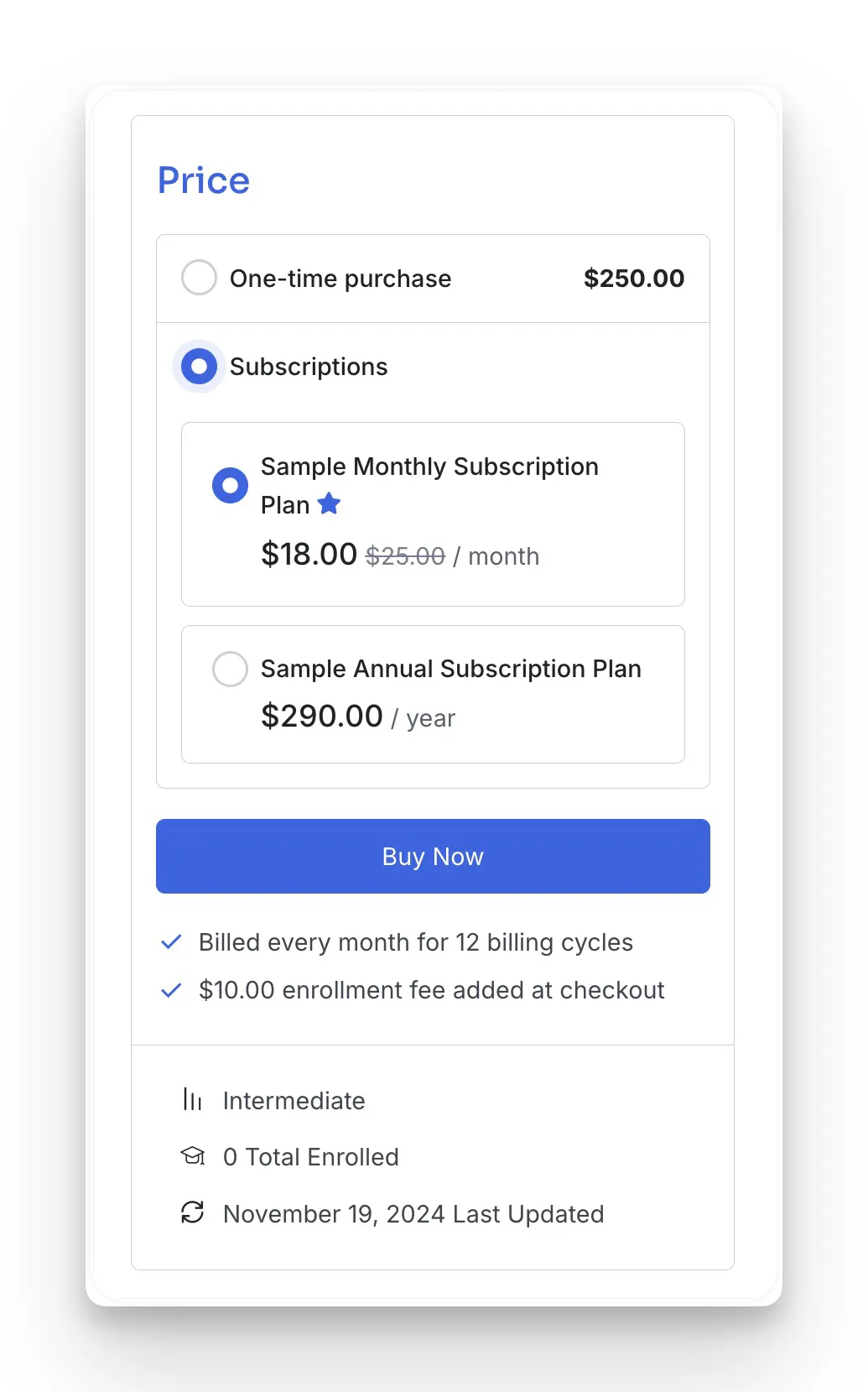
And you’re live. Students now see the Tutor LMS subscription options directly on the course page.
💡 Subscription + bundling tip: Subscriptions get even more powerful when you pair them with course bundles. Instead of attaching a subscription plan to a single course, you can bundle related courses together and offer recurring access to the entire package. Learn how to set this up in this guide on creating and selling course bundles using Tutor LMS.
Running Both Models Together (Hybrid Setup)
The hybrid approach is simpler than it sounds. You keep one-time prices on individual courses while also offering a Tutor LMS subscription plan that unlocks all courses, or a curated bundle of them.
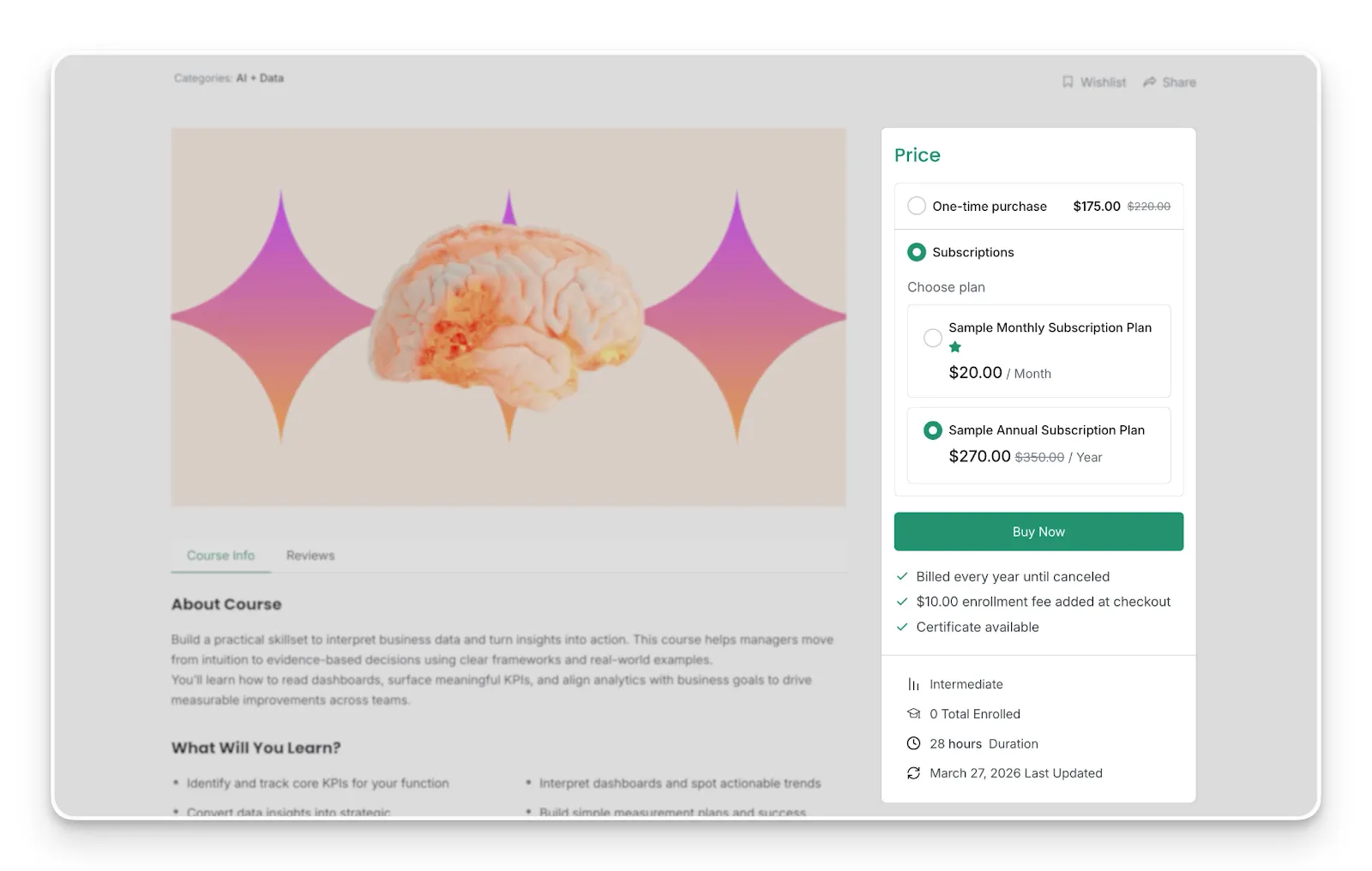
You can set both a one-time purchase price and one or more subscription plans on the same course. Students see both options on the course page and choose how they’d like to pay either a single upfront payment or a recurring subscription.
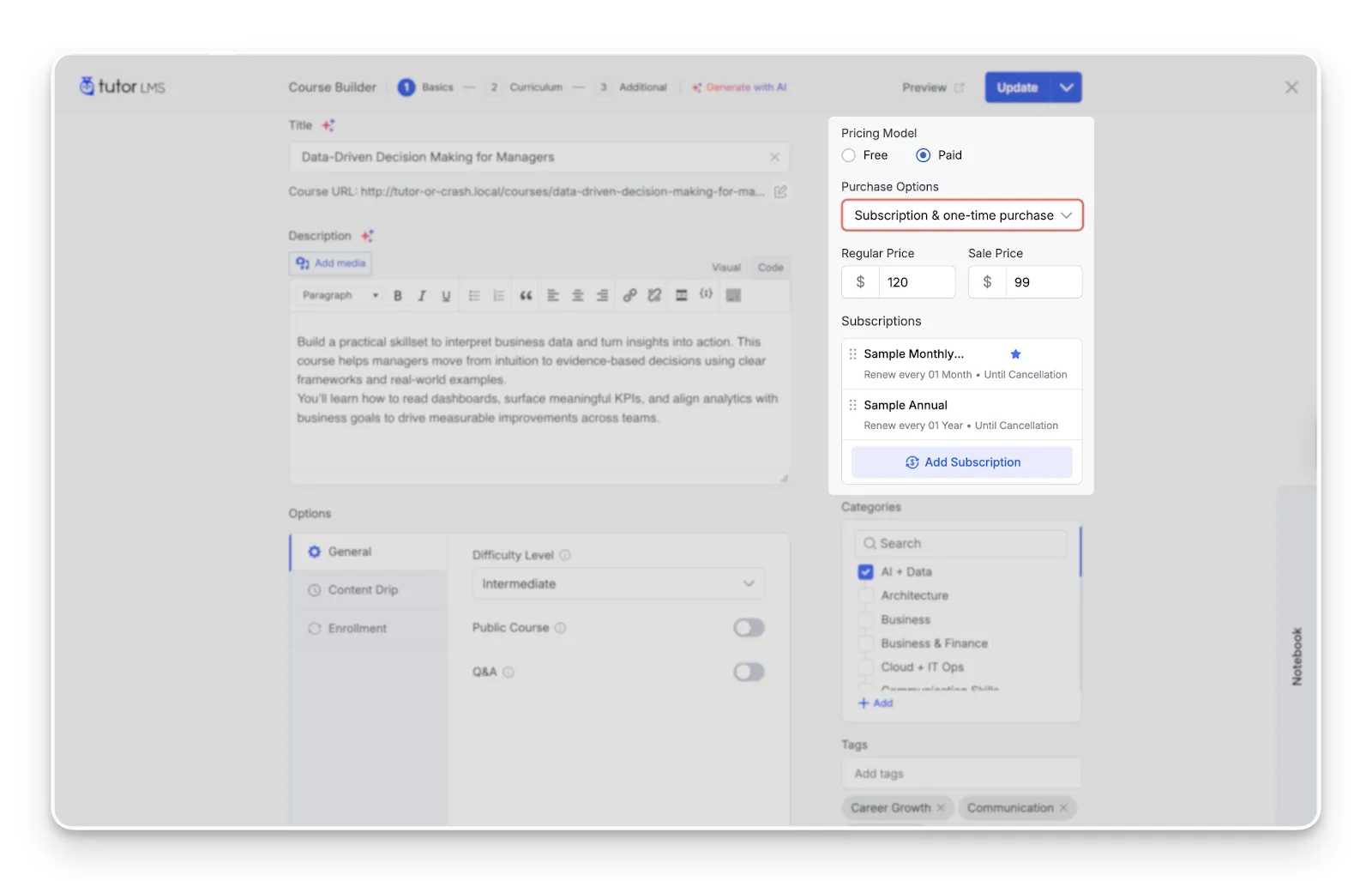
The platform handles the access logic automatically. Whether a student buys individually or subscribes, they get access without conflict or manual intervention. No duplicate enrollments, no confused permissions.
5 Course Pricing Tips to Maximize Revenue With Any Model
Whichever pricing path you choose, these five strategies can help with course revenue optimization from day one.
- Use tiered pricing: Offering Basic, Pro, and Premium subscription tiers captures different budget levels within the same audience. Tutor LMS supports multiple plans, so setting this up is pretty straightforward.
- Offer annual plans at a discount: The annual vs monthly subscription courses debate often comes down to one thing: commitment. A plan priced at $149/year versus $19/month saves students 35% while locking in 12 months of revenue for you. Reduced churn, faster cash flow.
- Add a free trial: A free trial course subscription reduces friction for hesitant buyers. Even a 7-day trial shifts the decision from “Should I pay?” to “Should I try?” Tutor LMS lets you configure trial periods directly within your subscription plan settings.
- Bundle courses together: Course bundle pricing increases the perceived value of both one-time packages and subscription libraries. Two or three related courses packaged together often convert better than any single course on its own.
- A/B test your price over 90 days: If you’re unsure which model fits your audience best, start with one approach, measure the results for 90 days, and then test the other or move to a hybrid. Real data always beats guesswork.
Choosing the Best Online Course Pricing Model for Your Goals
There is no universally “better” online course pricing model. The right choice depends entirely on your content, your audience, and your goals.
Subscriptions tend to earn more over time for creators who keep adding value and growing their course libraries. One-time pricing wins when you’re selling a high-ticket, standalone course that delivers a complete transformation. And the hybrid approach, which too few creators consider, captures the best of both worlds by meeting buyers wherever they are.
What matters most? Having a platform flexible enough to support whichever path you choose today, and adapt when your strategy evolves tomorrow. Tutor LMS is built for exactly that kind of flexibility, whether you’re starting with a single course or scaling a full membership library.

Table of Contents
- How Subscription and One-Time Course Pricing Models Work
- Which Course Pricing Model Fits Your Business?
- When a Subscription Pricing Model Is the Clear Winner
- Hybrid Course Pricing: Combining Subscriptions and One-Time Purchases
- How to Set Up Your Pricing Model in Tutor LMS
- Running Both Models Together (Hybrid Setup)
- 5 Course Pricing Tips to Maximize Revenue With Any Model
- Choosing the Best Online Course Pricing Model for Your Goals
Start Using Tutor LMS Today
Ready to take your online courses to new heights? Download Tutor LMS now and enjoy a journey of eLearning excellence.