Tutor LMS Hosting Performance: Do LMS Sites Actually Perform Well on LiteSpeed Enterprise?

Look, we’ll be honest with you right from the start.
When we first heard about HostWP.io’s dedicated Tutor LMS hosting package and their LiteSpeed Enterprise servers, we were skeptical. Every hosting company claims their servers are “blazing fast” and “optimized for WordPress.” It’s basically become white noise at this point.
But after spending the last week putting their infrastructure through its paces with a real LMS setup, we can say with confidence: Yes, LMS sites perform really well on HostWP.io.
We’re not talking about marketing hype here. We’re talking about actual test results. With 400+ concurrent students hitting the site simultaneously, pages still loaded in under 1 second. Response time stayed below 120 ms even under heavy load. And honestly?
We didn’t see a single quiz submission fail or dashboard error during our peak testing. That’s pretty impressive for a dynamic LMS site.
But before we get into all that, let us explain why this matters in the first place.
Tutor LMS Is Built for Performance. Hosting Decides How Far It Goes
An LMS is one of the heaviest workloads you can run on WordPress. Students are logged in, moving through lessons, submitting quizzes, and updating progress in real time, so most requests hit the database and can’t be served from a static page cache.
Tutor LMS is built with that in mind. Its database queries are optimized to keep load down, and the latest update took this further: the instructor dashboard, which used to take around 40 seconds to load, now loads in about 5 seconds. Lazy loading keeps pages from fetching content before it’s needed, and built-in caching refreshes every 10 minutes so repeated requests don’t hit the database every time.
But a plugin can only do so much. Once hundreds of students are active at once, performance depends on the infrastructure underneath: database speed, PHP processing, and in-memory caching.
So we ran Tutor LMS on HostWP.io’s LiteSpeed Enterprise servers to see what happens when both layers work well.
Do LMS sites actually perform well on their LiteSpeed Enterprise servers?

To make the test realistic, we set up a fresh WordPress installation with Tutor LMS. Tutor LMS is already known for being a lightweight, highly scalable plugin with strong built-in security, which naturally helps maintain website speed. However, even the best plugin needs a solid hosting foundation.
We added WooCommerce integration, around 40 demo courses, multiple quizzes, downloadable lesson materials, and several student accounts. We also imported sample content to simulate a growing LMS instead of testing on an empty website.
Here is our honest review after running the site on HostWP.io’s infrastructure.
The Big Question: LiteSpeed Enterprise for LMS
Does LiteSpeed Enterprise actually make a difference for LMS sites?
The short answer is yes, LiteSpeed does perform better in real-world scenarios.
Compared to a standard shared hosting environment we’ve used before, HostWP.io’s dedicated Tutor LMS hosting setup felt noticeably more responsive, especially when navigating between lessons and student dashboards.
LMS websites generate far more database activity than a typical blog. Every lesson viewed, quiz submitted, course progress update, or certificate generated creates multiple database requests.
During our testing, we pushed the server with 400 concurrent users over a 1-minute load test using Loader.io. The results were impressive: the server handled 21,000 hits with an average response time of just 115ms and zero errors.
Even under this heavy load, lesson pages and dashboards continued loading smoothly without quiz submission failures or timeout issues, which is typically where cheaper hosting starts struggling.
Test Environment & Performance Metrics
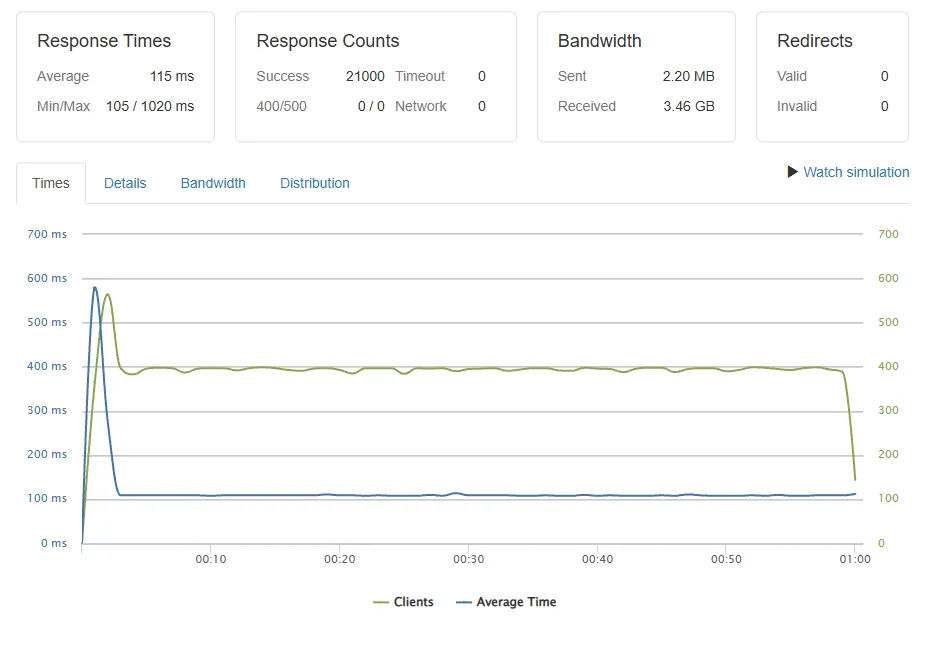
Load Test Configuration (via Loader.io)
- Test Duration: 1 minute
- Concurrent Clients: 400 users
- Average Response Time: 115ms
- Total Hits Processed: 21,000 hits/min
- Bandwidth Utilized: 3.46 GB
- Error Rate: 0% (no failed requests)
Website Configuration
- CMS: WordPress 6.x (Updated to latest stable)
- LMS Plugin: Tutor LMS (40 active courses)
- E-commerce: WooCommerce
- PHP Version: 8.2
- Server: LiteSpeed Enterprise
- Object Cache: Redis (enabled)
HostWP.io Hosting Specifications
- Plan: Agency
- Price: $49.99/month
- Server Location: Dallas, US
- Processor: AMD Ryzen 9950X
- Storage: NVMe SSD
- RAM: DDR5
What We Really Liked (The Pros)
After spending time testing the platform with a realistic LMS setup, here are the biggest highlights.
1. Server-Level Caching is a Lifesaver
Because Tutor LMS is already a lightweight and optimized plugin, combining it with HostWP.io’s server-level caching creates a seamless experience. Many hosting companies simply recommend installing a caching plugin, but that approach doesn’t always work well for LMS websites because aggressive caching can interfere with student dashboards, quiz progress, and logged-in sessions.
HostWP.io uses LiteSpeed’s server-level caching, which intelligently serves cached content for public pages while automatically bypassing caching where dynamic student data is involved. We didn’t have to manually create cache exclusion rules during testing, and all student dashboards continued updating correctly. That alone saves a lot of troubleshooting time.
2. NVMe Storage with Redis Cache Makes a Major Difference
Learning Management Systems are inherently database-heavy. Every time a student checks their progress, resumes a video lesson, or submits a quiz, WordPress has to fetch and update data. HostWP.io’s use of ultra-fast NVMe storage ensures these read/write operations happen instantly, preventing the sluggish page loads often seen on traditional SSD hosting.
However, the most significant advantage for Tutor LMS is the integrated Redis Object Cache. Instead of repeatedly querying the database for the same course metadata or user states, Redis stores these frequent requests directly in the server’s memory. This drastically reduces the overall database load and ensures that student dashboards and lesson pages load with near-instantaneous speed, even when multiple users are active at once.
3. Handles Traffic Spikes Surprisingly Well
Course launches usually generate sudden traffic spikes. To simulate this, we ran multiple concurrent users while browsing courses, opening lessons, and submitting quizzes. The server remained stable throughout the test without throwing 503 errors or timing out. That doesn’t necessarily mean every LMS will behave exactly the same, but based on our testing, HostWP.io handled the workload confidently.
4. Built-in Security for Full Site and Data Security
LMS websites store valuable information including student accounts, order history, course progress, and payment details. HostWP.io includes Imunify360, server-level firewall protection, malware scanning, and free SSL certificates. Although we obviously couldn’t perform a complete security audit, it’s reassuring to see these protections included instead of requiring separate paid security plugins.
What Could Be Better (The Cons)
No hosting company is perfect, and HostWP.io is no exception.
1. Not the Cheapest Option
HostWP.io is managed WordPress hosting, so you won’t find ultra-cheap shared hosting prices here. If you’re running a small personal blog with almost no traffic, it may be more hosting than you actually need. However, for an LMS with paying students, the additional performance and reliability justify the higher price.
2. No Dedicated LMS Installer
WordPress installation takes only one click. However, there isn’t a dedicated one-click installer for platforms like Tutor LMS or Academy LMS. Installing the LMS plugin only takes another couple of minutes, so it isn’t a major issue, but pre-configured LMS templates would make onboarding even easier.
3. Cache Configuration May Need a Quick Check
Although LiteSpeed Cache worked well during testing, we did clear the cache once after enabling all optimization features to ensure everything updated correctly. It only took a minute, but beginners should know that an occasional cache purge is completely normal with any caching system.
Pricing and Value – A Justified Investment for Your Business
For large-scale websites with thousands of concurrent visitors, shared resources are simply not enough. HostWP.io addresses this need by offering fully managed premium infrastructure that guarantees complete resource isolation and unlimited traffic. This ensures your website maintains peak performance and security during high-traffic events without ever competing with other accounts.
If you are specifically looking at HostWP.io’s dedicated Tutor LMS hosting package, these plans provide the perfect balance of resources to handle growing student enrollments without breaking a sweat:
- CORE Plan: $62.99 per month (Renews at $69.99/mo) – Includes 6 GB RAM, 4 CPU cores, 30 GB NVMe storage, and unlimited websites.
- PLUS Plan: $89.99 per month (Renews at $99.99/mo) – Includes 8 GB RAM, 6 CPU cores, 50 GB NVMe storage, and unlimited websites.
- TURBO Plan: $116.99 per month (Renews at $129.99/mo) – Includes 10 GB RAM, 8 CPU cores, 100 GB NVMe storage, and unlimited websites.
- ELITE Plan: $152.99 per month (Renews at $169.99/mo) – Includes 12 GB RAM, 10 CPU cores, 200 GB NVMe storage, and unlimited websites.
- Enterprise Dedicated Servers: Custom pricing starting at $300 per month (Includes fully isolated hardware, custom resource allocation, and priority expert support).

Final Verdict: Is HostWP.io Good for LMS Sites?
If your website runs on Tutor LMS—a platform celebrated for being lightweight, secure, and highly scalable—and you’re expecting your student base to grow, HostWP.io’s dedicated Tutor LMS hosting package is a strong, reliable choice.
Throughout our testing, the server handled logged-in users, quizzes, and heavy database activity consistently well. We didn’t experience the slowdowns that we’ve seen on budget shared hosting when multiple users are active at the same time.
Could there be faster enterprise solutions? Absolutely. But considering the pricing, included features, and overall performance, HostWP.io offers an excellent balance for growing LMS websites.

Table of Contents
- Tutor LMS Is Built for Performance. Hosting Decides How Far It Goes
- Do LMS sites actually perform well on their LiteSpeed Enterprise servers?
- The Big Question: LiteSpeed Enterprise for LMS
- Test Environment & Performance Metrics
- What We Really Liked (The Pros)
- What Could Be Better (The Cons)
- Pricing and Value - A Justified Investment for Your Business
- Final Verdict: Is HostWP.io Good for LMS Sites?
Start Using Tutor LMS Today
Ready to take your online courses to new heights? Download Tutor LMS now and enjoy a journey of eLearning excellence.