Installing Tutor LMS Beta Version
If you want to test the beta version of Tutor LMS, we recommend you do it in a test environment. This will allow you to try out the new features, see if anything breaks without worrying about the consequences, and easily give us the vital feedback that we need.
It is paramount that you follow the guidelines mentioned in this document when installing the beta version because, as the name suggests it is in the beta stage of development and is not entirely stable.
We will be taking valuable feedback from the beta version users to get firsthand insight into key improvements needed.
Now, follow the few steps discussed below to find out how you can get about installing the beta version for testing.
Download The Free Beta File
To download the beta version of the latest Tutor LMS upgrade, do the following:
- First, navigate to the Tutor LMS GitHub.
- Then, download the latest Tutor LMS beta zip file.
Note: Create a backup version of your entire site before you install the beta version. Of course, we reiterate once again that it would be ideal to install the beta only on a test site to try out the new features without the consequence of breaking anything.
Download The Pro Beta File
Next, follow along to download the pro beta version of the latest Tutor LMS beta version.
- Log in to your Themuem account and navigate to the downloads page.
- Click on download under the beta release file and the zip file should start downloading for you.
Note: The pro beta version is only available to the pro users of Tutor LMS and can only be availed by them. Check the previous section to download the free beta release if you do not own Tutor LMS Pro.
Installing The Free & Pro Beta Files
The installation process for both the free and pro beta versions is the same since we are installing a zip file. Once again we urge you to create a back of your site or use a test environment before going ahead with the beta installation.
Installing the Beta:
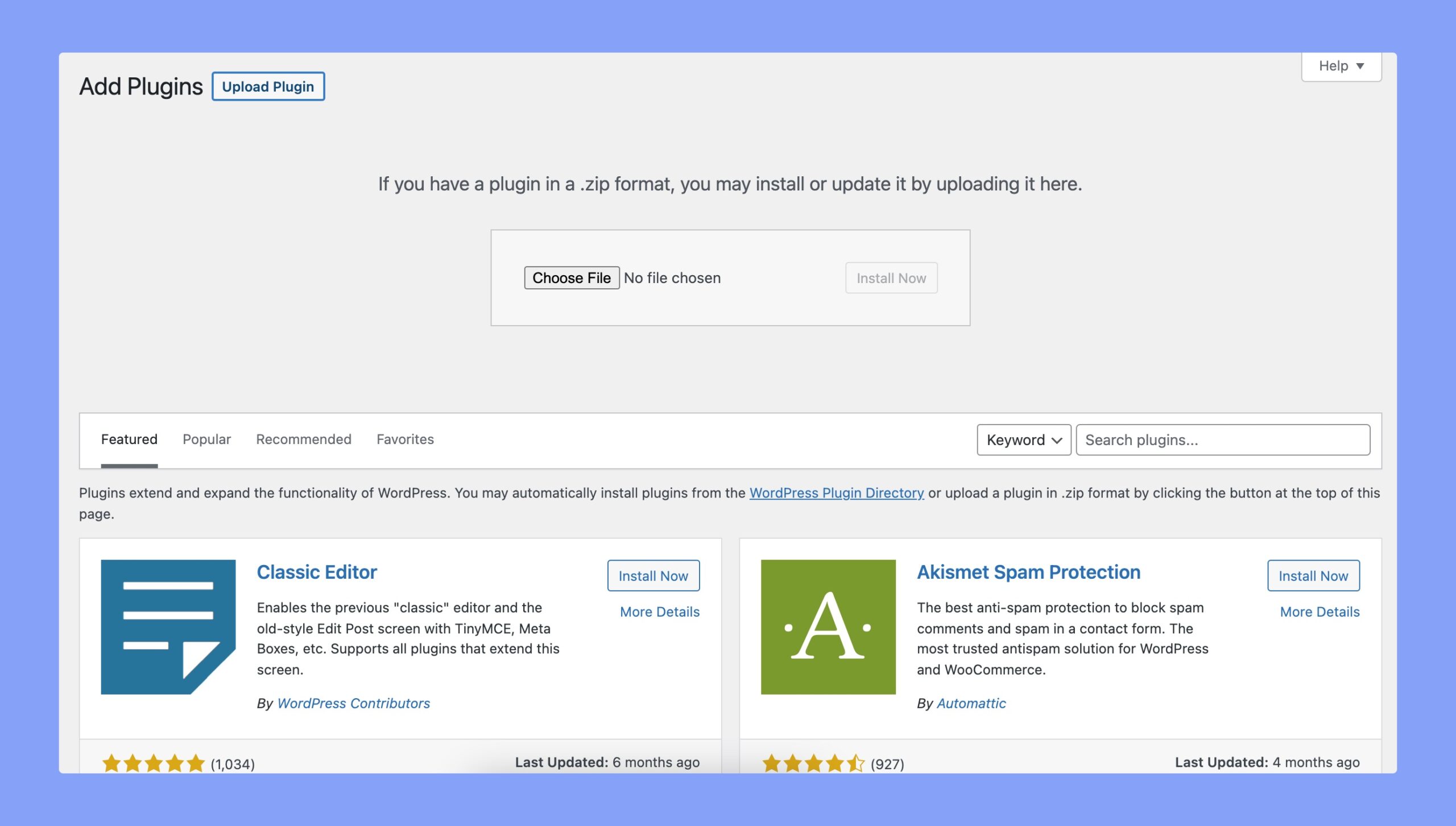
The installation process for both the free and pro beta versions is the same since we are installing a zip file. Once again we urge you to create a backup of your site or use a test environment before going ahead with the beta installation.
Installing the Beta:
- From the WordPress Admin Dashboard, navigate to Plugins > Add New > Upload Plugin.
- Here, click on Choose File to select the free beta zip file that you just downloaded and hit Install Now.
- Once it’s installed and activated, repeat the same process to install the pro beta zip file.
Now, you can enjoy using the latest beta version of Tutor LMS, and then let us know how you like the new features that come with it. Your feedback is truly valuable and plays a huge role in helping us improve the latest upgrade of Tutor LMS.
Happy testing and thank you for participating!
FAQ
Is it safe to use Tutor LMS 2.0 Beta on your production site?
Tutor LMS 2.0 Beta is an experimental build meant for testing purposes. We strongly recommend you not to use Tutor LMS 2.0 Beta on your production sites. Use it on staging environments and remember to backup your entire website before updating.
Will I get any support for Tutor LMS 2.0 Beta?
Since this is an experimental release and should not be used on production sites, we won’t be providing any support for Tutor LMS 2.0 Beta.
Where can I report bugs or provide feedback?
On the description section, you’ll see a form with the text “Report a Bug”. In this form, you can fill in your issues or provide your feedback regarding the Beta release.